Adventures in Publishing, Part II

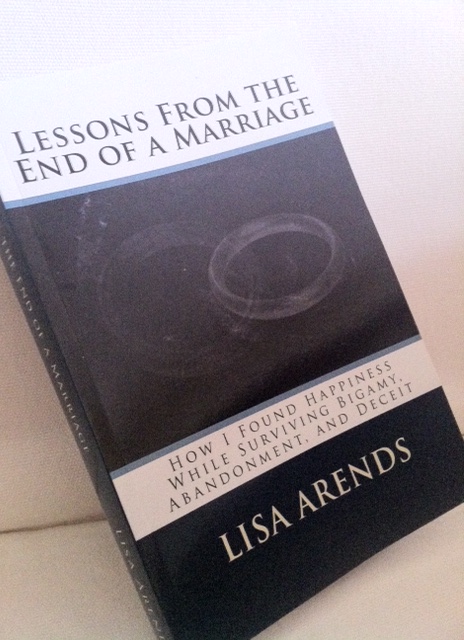
The proof copy of the book came in the mail today! 🙂


It’s a bit strange. I’ve gone from being completely ignorant about self-publishing to being to go-to person amongst my friends in the span of two months. I’ve already explored the early stages of the process here and now I will share some of the other hits, suggestions, frustrations and random thoughts about the process now that I am a whole month wiser (I need a sarcasm font!) and I have a couple more iterations of my book under my belt.

Because endless formatting and the start of the school year have left me unable to assemble sentences coherently, I’m going to present this in a series of rambling bullet points.

First, a primer. I published using three platforms: Kindle Direct Publishing (ebook, Amazon), PubIt! (ebook, Nook), and CreateSpace (print, Amazon) in that order.

– ebooks are da bomb! Both programs were easy to work with and the formatting took a minimum of hassle. After I got my head around how certain styles and formatting options looked in html (the file type used for e-readers), it was pretty simple. The main difference between the two programs is that Kindle wants page breaks and PubIt! want section breaks (the latter is also used in CreateSpace so starting from a PubIt! formatted file saves some time).

-For the initial digital cover, I first tried using Fiverr, but I wasn’t happy with what came back. I ended up using Clipart (the online library is pretty good these days) to create my own image in the specified dimensions, saved it as a PDF, and then converted it into a JPEG. It was pretty simple. The main criteria to keep in mind is that the cover needs to look good as a thumbnail.

-I’m not sure about PubIt!, but Kindle offers formatting for a fee (under $100) if you don’t want to tackle it yourself. Otherwise, it’s free. Honestly, it was simple enough, I wouldn’t pay for this service.

-Another benefit of the ebook format is that you can update your file at any time.  The turnaround seems to be a few days for the old file to be replaced with the new.

-I was planning on delaying the release of the print book for several months, mainly to give myself a break and to allow time to collapse after the early days of the school year. Alas, it was not to be:) I was surprised how many people not only preferred tangible books, but did not have access to an e-reader, smart phone, or iPad. So, I quickly got to work reformatting.

-Print books are another animal entirely. With an e-reader, you don’t have to worry about where the text breaks because it is different on every device and changes with the user settings. A paperback is static. You have to get that spacing right. CreateSpace walks you through the process. After I selected my book size (6″x9″), I downloaded a free MS Word template in which to paste my text. This is where I made mistake #1. I assumed that the template was already sized for the format I selected since it came after I was prompted to choose a size. Wrong. The template was for a standard size page. So, I formatted (and numbered!) the whole thing incorrectly on the first pass. Grrr. Unlike me, you should change the paper size (under page formatting) first. The template is a bit strange to get used to – it looks like an open book but the odd pages are on the left, not the right as it will be in print. Have fun with that one.

-I decided to purchase an ISBN number ($99) through Bowker so that I have options regarding distribution. CreateSpace gives you information on all of your options. As a side note, if you purchase your own ISBN, you are technically opening your own publishing house. I’m having fun with that one.

“What did you do this summer?”

“Oh, I just wrote a book and opened my own publishing house.”

Giggle:) I don’t tell them it was as easy as providing my address and credit card number.

-Next, set your margins. For most books, set the outer margins to .50 and the inner to .75. If your book ends up greater than 400 pages, your gutter will need to be increased.

-At this point, I recommend uploading your file to CreateSpace so that it can scan for errors and you can view the document in their mock-up program. This way you can fix any margin or gutter issues before you spend time on fonts and spacing. And, yes, this would be mistake #2. You can upload Word or PDF files. I had better luck with PDF holding true to format.

-Now it’s time to start working with the text. Make sure all of the text is the font and size you desire. I’m not going into all of that here – Google it for more information on fonts than you ever wanted to know. Size everything the way you want it before you begin monkeying around with spacing. Yup, you guessed it. That was my mistake #3.

-Okay, you’re margined and sized? Now you have the delightful task of playing with spacing and section breaks. If you need to change entire paragraphs, select the entire document and play around with Word’s paragraph settings. You can specify where they break, if words are hyphened, and the amount of space between paragraphs. Once the basic settings are where you want, go page by page and make sure that paragraphs are where you want. Remember that new chapters should always begin on odd numbered pages (left side in the template). If you need to add a blank page to make that happen, use a section break. One quirk to be aware of – you are not allowed more than three blanks in a row, including at the beginning and end of the book.

-A brief interlude: Save multiple copies of your file as you move through the process. My file became corrupted as I was putting on the finishing touches. I had been saving versions of it at various points, which ended up saving me. I still had to redo all of the formatting, but I could dig through several versions to find the most recent, yet uncorrupted, file.

-The final step is to insert headers (usually title or title/author) and footers (page numbers). I used the directions on this site. Once you get the hang of it, the page numbers aren’t too bad. Until you get the hang of it, you want to throw your computer out the window.

-Speaking of computers…I have a cute little 11″ MacBook Air. I love the thing. It’s small enough to slip into my purse or a backpack and take to the park or a coffee shop. The battery lasts long enough that I rarely have to worry about bringing along a charger. During the formatting process, however, my computer was not my friend. Its screen was simply too small to be efficient. If you have access to a large monitor, use it for this process!

-I thought I was home free after I finished the interior of the book. I was planning on using the image from my thumbnail in the cover template from CreateSpace. Yeah, not so much. First, the cover creator in CreateSpace is pretty (read: very) limited. There are only a handful of templates to choose from and they offer little in terms of customization. After discovering that the pixel count wasn’t high enough in my original image (they suggest 300 dpi), I had to start over from scratch. I was frustrated with the lack of choice, but I didn’t want to spend the time or money to create a cover (much harder to do for a physical book) without the template. If you use their program, try to enter the process with only a general idea of what you want so that you are not frustrated with their (lack of) options. If you’re still counting, I would call that mistake #4.

-As with Kindle, you can pay CreateSpace (around $300) to do the formatting for you. This may be worth it, especially if you have images or other elements that make it difficult to format.

Overall, self-publishing is relatively easy and can be done for little to no money. It is a great option to get your book out to the world without relying on the whims of agents and publishers. So, what are you waiting for? Finish that book you’re always talking about writing!

Welcoming the End of an Era

Closed Book

It is done.

Finished.

After spending the last two months stuck to my office chair like peanut butter on the roof of Tiger’s mouth (trust me, it’s quite an image), the book has been completed.

As I type, it is currently showing as “publishing” on Amazon. That word is teasing me. Sticking out its tongue. Amazon states that it takes up to 12 hours for a book to publish. What infernal wording! Imagine submitting a blog post and having to wait half a day (or up to, so you never really know when it will go live). Except this isn’t just a blog post. It’s 79,000 words that took 3 years to write.

Finishing the book is an amazing emotional release. Tears tickled the corners of my eyes as I went out on my evening run. That entire chapter of my life is over. Done. Finished. I have found release and peace through the process of writing the book. I have cried countless tears as I relived the most painful memories while they were recorded in words. I screamed at my ex all over again as I looked at what he did through a writer’s eyes. I laughed at the humor and shook my head in disbelief at the absurdity of the whole story.

And now it is just a story to me. It is a story to share so that others can realize they are not alone on their journeys and can (hopefully) find inspiration through my pilgrimage to happiness. The end of the book is the end of an era.

So now I wait for the word I want to see.

Published.

Therapy in the Writing Process

Journaling has long been accepted as a useful tool in the therapeutic process. Traditional journaling can certainly provide benefits. It is a “safe” space to explore powerful feelings. It encourages reflection and honesty and can lead the writer to a better understanding of him or herself. I believe that journaling can be even more beneficial, specifically  after a traumatic event, when it is expanded to cover the entire writing process. Each step in the process helps to promote healing in a different way and the completion of all of the steps will help the writer to move forward from the trauma.

Pre-write: This is the time to purge all of the negative emotions. Do not censor yourself. Do not worry about sentence structure or grammar; simply let the words flow. This stage is wonderful for helping to cleanse the mind of all of the poisonous emotions that can damage self or others if bottled up or inappropriately expressed. Stay at this stage until the anger has lessened to the point where rationality has returned. Feel free to return to this stage as needed.

Rough Draft: After you have purged your mind of the initial anger and hurt, it is time to start making sense of your trauma. Craft your preliminary version, focusing on organizing your thoughts and ideas.This is the time to begin to make sense of your story. Examine cause and effect. Consider different perspectives. Blend the raw emotion from your pre-writing with rational thought born from time and distance.

Edit: Read your draft. Edit for spelling and grammar. Revise your sentences and paragraphs until they are succinct and powerful. Read your draft again. The editing process allows you to find distance from your story. Each time you read it, especially as your focus is on the mechanics rather than the content, you will find that you become slightly more removed from the pain.

Publish: Don’t worry, you don’t have to have an agent for this or even research self-publishing. Rather, share your story with at least one other person. By sharing your writing, you are showing that you own your story. It is yours to tell as you wish. This helps to take you out of a victim mode and casts you as the author of your life.

Pick up the pen and write the rest of your story.

Adventures in Publishing

Somehow it seems appropriate to be here three years after my tsunami divorce.

Just days after the end, I picked up a pen and wrote voluntarily for the first time in my life.  Days after that, I moved my journal to the computer and began to craft a book out of my life. I wrote consistently, even compulsively, for a couple months.  It was therapy.  I spewed my rage and sorrow upon the keyboard and somehow some a story was crafted. Then, as abruptly as I started writing, I stopped.  For two years, I knew that I intended to finish the book, but I couldn’t bring myself to work on it.  The original intensity had faded, yet it was too painful to give the file more than a cursory look.

Finally, last winter, I knew I was ready to begin again.  A friend recommended that I start this blog.  It was a great suggestion, as this has been a place for honing my writing, brainstorming ideas, learning to be comfortable with my writing and story being “out there,” and it has opened up bigger opportunities.  It has also been a distraction from writing the book; 800 word typo-filled blog posts are much easier to write than a full-length fully-edited book.  Who knew? 🙂

It’s tangible.

My goal for this summer was to actually finish the book rather than just talk about it.  I’m pretty much there.  It’s written. It’s formatted. It’s currently being edited.  Once the final changes are made, I’ll upload the final version into KDP (Kindle Direct Publishing) and click “submit.” (…and then re-format the whole thing again for the print version…but I’m not ready to think about that yet!)

A few months ago, I wrote a post contemplating when I could call myself a writer.  I definitely feel like one now after a solid month of sitting on a hard chair in a hot office pounding away at the keys.  The sore brain and butt confirm it. So does the almost full ream of paper it took to print the thing for the editor:)

Computer on the left, book on the right.

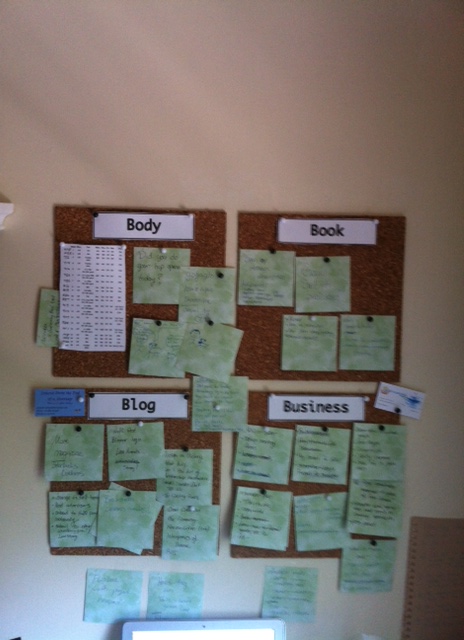
It’s been a crazy summer pushing to get all my projects done before school starts up again (which for teachers around here is just a couple weeks away!). I used a 4-part motivation/organization/idea board to keep me going.

FYI – “Body” has my marathon training schedule and reminders to stretch!

It’s crazy to think that I’ll be ready to change the label on the “book” square soon.  Any suggestions for what I should add there?

I know my boyfriend and the animals will be happy to have me spend more time downstairs instead of holed up in my office.  He (the boyfriend, not the dog!) leaves me little notes around my desk.  I found this one in the spiral I use to jot down notes a couple days ago.

You finally get to see what the boyfriend looks like! 🙂

Tiger and Maddy have enjoyed my time writing.  This is on the couch behind my desk.

We think of Tiger as a Pit Bull Ambassador.

This has been an amazing adventure.  The book has been so therapeutic to write; working with the story has helped to distance me from some of the pain.  I have learned so much in the process as I have taken the needed steps to take the book from its infancy three years ago to a finished and published (and hopefully read!) product.

I love that I’m celebrating (yes, celebrating) the three-year anniversary of the tsunami with the completion of the book. It feels like I’m ready to close that chapter of my life and move on to my new lessons.

Until then, I am enjoying some summer (which means resting my brain and running my butt) while awaiting word (hopefully not too many!) from the editor.  And, soon, I hope to push “submit!”

Adventures in Publishing, Part II

How to Become a Huffington Post Blogger

In the last few weeks, I have been receiving quite a few inquiries about how I started blogging for the Huffington Post.  The short answer?  It was a combination of daily work and luck.  Here are my tips for those of you who are interested in getting your writing out on the big stage:

Image representing Huffington Post as depicted...

1) Read the Huffington Post.  Daily.  You don’t have to read the entire site, just focus on the sections which are of interest to you and are similar in topic to your writing.  You won’t know what they are looking for if you are not familiar with the material on the site.  I find that it is easiest to subscribe to my sections of interest  in my RSS reader so that I get a notification when a new article is posted.  That becomes especially important with tip #2.

2) Comment on articles and blogs.  Take the time to craft well thought out responses that add to the post or provide an alternate view in a respectable tone.  The best comments provide some information while hinting that you have more to say on the topic at hand.  Leave them wanting more.  You can link to your blog or your other writings on the topic.  This is where the work comes in; I spend thirty minutes or so a day reading and commenting on appropriate articles.

3) In the meantime, work to create a body of writing if you have not already.  This shows your writing style as well as demonstrates that you have a unique view or story to share.

Writing

4) Keep this up for a while and you may get lucky and have an editor contact you with a blog idea.  If this doesn’t happen, then proceed to #5.

5) On the “Contact Us” link on Huffington Post you will find a link to submit a pitch for a blog.  They give you the option of submitting the full text or just a description of your blog idea.  I have not gone this route, but I would recommend submitting the entire post so that your ability to craft a quality product is not in question.  Also, write about an area where you are passionate; it will show in your writing and will pull others in.

I wish everyone the best on their writing, whether you keep a private journal, a public blog, or are working to become a published author.

You can find my Huffington Post submissions here. My book is available on Amazon and you can read about my experiences with publishing here and here.

Huffington Post also led to my appearance on The Jeff Probst Show!