Confessions From a Book Voyeur

I have a confession to make.

I am a book voyeur.

Whenever I enter a space for the first time, I immediately scan the room for bookshelves. If my eyes are lucky enough to land upon shelves laden with tomes, I find myself pulled towards the books as surely as iron to a magnet. My head soon takes on that particular tilt used to read the turned titles and my hand gently glides along the spines. As I scan the selections, I am taking in information about their owner: interests, abandoned hobbies, areas of study, preferred escapes and future dreams. The books don’t waste time on small talk; each one is there for a purpose and that is communicated through its glossy cover.

Sometimes, even if I am in mid-conversation, I start to slide the books off the shelf, one at a time, and flip through them. If one catches my eye, I will sit cross-legged on the floor next to the bookshelf and I will begin to read. I have been known not to stop until the final page is turned.

My ex-husband and I had hundreds of books between us. We each had our own nonfiction libraries. Mine was filled with math and science books, his with graphic design and rendering texts. We had a co-mingled fiction library overrun with horror and scifi. When I left, I left most of that library behind, as I no longer had the space to store so many books. In the past few years, I have accumulated a small collection again. A collection that speaks to visitors about me.

photo-153

Calculus& Trig books: I rescued some of the main books I used to use for tutoring from my old house. I haven’t tutored in the past 3 years, but it is always a fallback income. I also have a full collection of math books (algebra & geometry) in my classroom.

Mary Roach’s books: These are the only other rescues. I had just discovered her when my ex left and I couldn’t bear to part with them yet.

Nutrition and wellness texts: These were from my certification program to become a nutrition and wellness coach.

The Lucifer Principle: I picked this up in the bargain aisle at Barnes and Noble while waiting for a date.

Javascript: This was a gift from my dad as I was exploring career options post-divorce. I made it about 1/3 of the way through (doing the exercises along the way) and I fully intend to complete the program.

Shift : I love this book. I use its ideas with coaching clients all the time.

Growing Through Divorce :The only divorce themed book on my shelf, other than mine:)

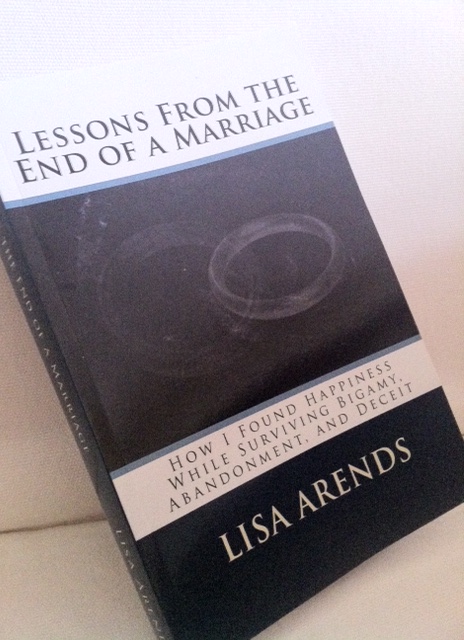
Lessons From the End of a Marriage: Still feels strange to see my dream in paperback.

The Sociopath Next Door: The first reading I did that gave me something to think about regarding my ex’s mental state.

Hiking and camping books: Duh. You can’t tell me you’re surprised? πŸ™‚

Dictionary: I usually use the one on the computer, but I sometimes like to read the real version for fun. Nerd alert #1.

Stephen Hawkins: Nerd alert #2.

Stephen King: He has been my favorite author since I was 10. I used to have the entire collection. Now, I have two real books and many more on my Kindle. I love his blend of gritty reality and fantasy.

In Search of the Warrior Spirit: This is one that Brock loaned me that ended up in my collection. All his reading centers on martial arts, survival, and training. He directs some of them my way and I’m often surprised to find how much I relate. I love how he and I learn parallel lessons through different avenues.

Dean Koontz and Six Degrees of Separation: Nope, not related except that I bought them from the same used book store on an emergency book run while on a visit to San Antonio.

Nicholas Evans – The Divide: Waaaay out of my usual genre. This was snatched from my mom’s bookshelf on that same trip. This is why I love my Kindle so much – I never have to worry about running out of books again:)

Seattle books: These were a gift from my dad when I was planning on moving to the rainy city.

The Brief Wonderous Life of Oscar Wao: This was a hand me down from a guy I briefly dated.

Mental Floss’s History of the World: I love Mental Floss’s brand of intellectual entertainment. My mom bought this for me from the Carlos Museum’s gift shop while she was in Atlanta for a visit.

During our first holiday season together, Brock grew tired of the spread of books that followed me around his house. He bought me a Kindle, expecting that small tablet would eliminate the literary clutter. Much to his dismay, for the first year or so, it was simply another book, keeping the library loans company. In time, however, I have shifted my reading habits. The library now offers Kindle loans and Amazon always has a selection of free reads. I rarely read print books anymore. This works well for me. It saves space, time, and wrist strength. I thought I would miss the tangible feel of the paper and the distinctive odor that belies the age of the pages, but I do not. What I do miss is the decreasing ability to scan bookshelves. I have no shame in handling the books of a near-stranger, but I would never dream of pursuing the menu of someone’s e-reader of choice. Our choice of books has become more private even as we increasingly live our lives openly online.

Consider yourself warned. If I ever find myself invited into your space, your medicine cabinet is safe. You can trust me with your wallet or your kids. But you might need to watch me around your books:) After all, it’s only fair. I showed you mine.

If You Would, Please

If you have read my book, please consider writing a review on either Amazon or Barnes and Noble. Many of you have shared your thoughts with me privately. I have loved hearing about what you gained from the book and I know that others would also benefit from hearing your response. Reviews, especially for unknown and self-published authors, are hugely important as they help to increase the visibility and legitimacy of a new book. A huge thank you to all of you for all your support! I very much appreciate it!
Oh, and if you haven’t read it, what are you waiting for? :)P

Adventures in Publishing, Part II

The proof copy of the book came in the mail today! πŸ™‚


It’s a bit strange. I’ve gone from being completely ignorant about self-publishing to being to go-to person amongst my friends in the span of two months. I’ve already explored the early stages of the process here and now I will share some of the other hits, suggestions, frustrations and random thoughts about the process now that I am a whole month wiser (I need a sarcasm font!) and I have a couple more iterations of my book under my belt.

Because endless formatting and the start of the school year have left me unable to assemble sentences coherently, I’m going to present this in a series of rambling bullet points.

First, a primer. I published using three platforms: Kindle Direct Publishing (ebook, Amazon), PubIt! (ebook, Nook), and CreateSpace (print, Amazon) in that order.

– ebooks are da bomb! Both programs were easy to work with and the formatting took a minimum of hassle. After I got my head around how certain styles and formatting options looked in html (the file type used for e-readers), it was pretty simple. The main difference between the two programs is that Kindle wants page breaks and PubIt! want section breaks (the latter is also used in CreateSpace so starting from a PubIt! formatted file saves some time).

-For the initial digital cover, I first tried using Fiverr, but I wasn’t happy with what came back. I ended up using Clipart (the online library is pretty good these days) to create my own image in the specified dimensions, saved it as a PDF, and then converted it into a JPEG. It was pretty simple. The main criteria to keep in mind is that the cover needs to look good as a thumbnail.

-I’m not sure about PubIt!, but Kindle offers formatting for a fee (under $100) if you don’t want to tackle it yourself. Otherwise, it’s free. Honestly, it was simple enough, I wouldn’t pay for this service.

-Another benefit of the ebook format is that you can update your file at any time.Β  The turnaround seems to be a few days for the old file to be replaced with the new.

-I was planning on delaying the release of the print book for several months, mainly to give myself a break and to allow time to collapse after the early days of the school year. Alas, it was not to be:) I was surprised how many people not only preferred tangible books, but did not have access to an e-reader, smart phone, or iPad. So, I quickly got to work reformatting.

-Print books are another animal entirely. With an e-reader, you don’t have to worry about where the text breaks because it is different on every device and changes with the user settings. A paperback is static. You have to get that spacing right. CreateSpace walks you through the process. After I selected my book size (6″x9″), I downloaded a free MS Word template in which to paste my text. This is where I made mistake #1. I assumed that the template was already sized for the format I selected since it came after I was prompted to choose a size. Wrong. The template was for a standard size page. So, I formatted (and numbered!) the whole thing incorrectly on the first pass. Grrr. Unlike me, you should change the paper size (under page formatting) first. The template is a bit strange to get used to – it looks like an open book but the odd pages are on the left, not the right as it will be in print. Have fun with that one.

-I decided to purchase an ISBN number ($99) through Bowker so that I have options regarding distribution. CreateSpace gives you information on all of your options. As a side note, if you purchase your own ISBN, you are technically opening your own publishing house. I’m having fun with that one.

“What did you do this summer?”

“Oh, I just wrote a book and opened my own publishing house.”

Giggle:) I don’t tell them it was as easy as providing my address and credit card number.

-Next, set your margins. For most books, set the outer margins to .50 and the inner to .75. If your book ends up greater than 400 pages, your gutter will need to be increased.

-At this point, I recommend uploading your file to CreateSpace so that it can scan for errors and you can view the document in their mock-up program. This way you can fix any margin or gutter issues before you spend time on fonts and spacing. And, yes, this would be mistake #2. You can upload Word or PDF files. I had better luck with PDF holding true to format.

-Now it’s time to start working with the text. Make sure all of the text is the font and size you desire. I’m not going into all of that here – Google it for more information on fonts than you ever wanted to know. Size everything the way you want it before you begin monkeying around with spacing. Yup, you guessed it. That was my mistake #3.

-Okay, you’re margined and sized? Now you have the delightful task of playing with spacing and section breaks. If you need to change entire paragraphs, select the entire document and play around with Word’s paragraph settings. You can specify where they break, if words are hyphened, and the amount of space between paragraphs. Once the basic settings are where you want, go page by page and make sure that paragraphs are where you want. Remember that new chapters should always begin on odd numbered pages (left side in the template). If you need to add a blank page to make that happen, use a section break. One quirk to be aware of – you are not allowed more than three blanks in a row, including at the beginning and end of the book.

-A brief interlude: Save multiple copies of your file as you move through the process. My file became corrupted as I was putting on the finishing touches. I had been saving versions of it at various points, which ended up saving me. I still had to redo all of the formatting, but I could dig through several versions to find the most recent, yet uncorrupted, file.

-The final step is to insert headers (usually title or title/author) and footers (page numbers). I used the directions on this site. Once you get the hang of it, the page numbers aren’t too bad. Until you get the hang of it, you want to throw your computer out the window.

-Speaking of computers…I have a cute little 11″ MacBook Air. I love the thing. It’s small enough to slip into my purse or a backpack and take to the park or a coffee shop. The battery lasts long enough that I rarely have to worry about bringing along a charger. During the formatting process, however, my computer was not my friend. Its screen was simply too small to be efficient. If you have access to a large monitor, use it for this process!

-I thought I was home free after I finished the interior of the book. I was planning on using the image from my thumbnail in the cover template from CreateSpace. Yeah, not so much. First, the cover creator in CreateSpace is pretty (read: very) limited. There are only a handful of templates to choose from and they offer little in terms of customization. After discovering that the pixel count wasn’t high enough in my original image (they suggest 300 dpi), I had to start over from scratch. I was frustrated with the lack of choice, but I didn’t want to spend the time or money to create a cover (much harder to do for a physical book) without the template. If you use their program, try to enter the process with only a general idea of what you want so that you are not frustrated with their (lack of) options. If you’re still counting, I would call that mistake #4.

-As with Kindle, you can pay CreateSpace (around $300) to do the formatting for you. This may be worth it, especially if you have images or other elements that make it difficult to format.

Overall, self-publishing is relatively easy and can be done for little to no money. It is a great option to get your book out to the world without relying on the whims of agents and publishers. So, what are you waiting for? Finish that book you’re always talking about writing!